How it fits together
You design the UI in Lovable, and Arxentra runs everything: your frontend, your backend API and its Postgres database. The two connect through GitHub — Lovable pushes your project there, and Arxentra deploys from it on every push.
You set this up once. After that, every change you make in Lovable goes live on Arxentra automatically.
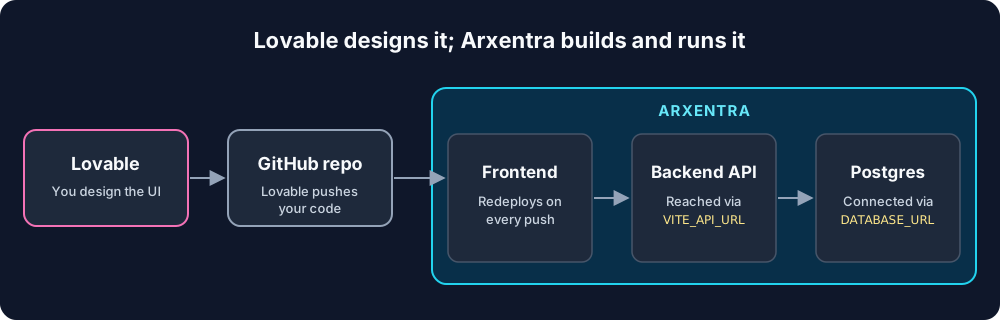
The steps start with the backend, so the frontend has an address to call when it deploys.
Before you start
- An Arxentra account, with the Arxentra GitHub App installed on your GitHub account or organisation.
- A Lovable project.
- A GitHub account that both Lovable and Arxentra can reach.
- Your backend code in its own GitHub repository (any language: Node, Python, Go and so on). Skip this if your app has no backend.
Step 1: Deploy your backend
Deploy the backend first, so the frontend has an address to call.
If you turned on a database, Arxentra gives your app its connection string in the `DATABASE_URL` environment variable. Read it from there; don't hard-code credentials.
Step 2: Connect Lovable to GitHub
Lovable keeps your project in sync with a GitHub repository, and Arxentra deploys from that repository.
From now on, Lovable pushes your changes to GitHub as you work.
If Lovable can't push to your branch, for example because it is protected, it pushes to a branch called `lovable-sync` instead. Arxentra never deploys that branch on its own, so merge it into your main branch to ship the change.
Step 3: Deploy the frontend
Deploy the Lovable repository the same way as the backend.
- Newer projects (TanStack Start) run as a Node server on port 3000.
- Older projects (Vite) are built and served as a static site, and links to deep pages such as `/dashboard` work.
Auto-deploy is on by default for Lovable projects: every push from Lovable redeploys the frontend. To turn it off, open the service and switch off auto-deploy. It stays off once you do.
If your project has a `.env` file with `VITE_` values in it, Arxentra uses those during the build. You don't need to enter them again.
Step 4: Link the frontend to the backend
Linking tells the frontend where your API lives, so you never paste URLs into code.
After the redeploy, your app can read the backend's public address from `VITE_API_URL`. Arxentra also sets `REACT_APP_API_URL`, `NEXT_PUBLIC_API_URL`, `VUE_APP_API_URL` and `API_URL` to the same value, for other frameworks and for server-side code.
Linking also adds the frontend's address, including any custom domain, to the backend's allowed origins (Step 5). If the backend had no CORS setting before, Arxentra warns you first and offers to allow Lovable's domains too.
Step 5: Allow your frontend in CORS
Browsers block a page on one address from calling an API on another unless the API allows it. That permission is CORS, and you set it on the backend service.
Wildcards must name a real domain. `https://*.example.com` works; `https://*.co.uk` and anything under `arxentra.app` are rejected, because they would let other people's sites in.
Prefer to handle CORS in your own code? Turn on Let my app handle CORS. Arxentra then adds no CORS headers, and gives your app the allowed list in `CORS_ALLOWED_ORIGINS` (comma-separated). In FastAPI, for example:
import os
from fastapi.middleware.cors import CORSMiddleware

origins = [o for o in os.getenv("CORS_ALLOWED_ORIGINS", "").split(",") if o]
app.add_middleware(CORSMiddleware, allow_origins=origins,
                   allow_credentials=True, allow_methods=["*"], allow_headers=["*"])
If you handle CORS yourself, redeploy the backend after you link a frontend, so it picks up the new list.
Optional: Let Lovable's AI call your API
This step lets Lovable's AI see your endpoints and call your API while you build in the Lovable editor. Your deployed app doesn't need it: it calls the backend directly through `VITE_API_URL`.
You don't need a Lovable API key. Arxentra creates a key for your backend, and you give that key to Lovable.
Your backend must check the key. Arxentra does not check it for you. The key reaches your app as the `ARXENTRA_API_KEY` environment variable. Reject any request that doesn't carry it. In FastAPI:
import os, secrets
from fastapi import Header, HTTPException

def require_key(authorization: str = Header("")):
    expected = "Bearer " + os.environ["ARXENTRA_API_KEY"]
    if not secrets.compare_digest(authorization, expected):
        raise HTTPException(status_code=401)
In Express:
const crypto = require("crypto");

function requireKey(req, res, next) {
  const got = Buffer.from(req.get("Authorization") || "");
  const want = Buffer.from("Bearer " + process.env.ARXENTRA_API_KEY);
  if (got.length !== want.length || !crypto.timingSafeEqual(got, want)) {
    return res.sendStatus(401);
  }
  next();
}
Never put this key in your frontend code or in a `VITE_` variable. Anything built into the frontend can be read by anyone who opens your site. Signed-in users of your app should log in through your backend's own auth instead. If the same routes serve both, accept either a valid user token or the key.
Prompts to paste into Lovable
Lovable writes better code when you tell it exactly where the API is and what it returns. Paste these into the Lovable chat and adjust them to your API.
Point the app at your backend:
All API calls go to the base URL in import.meta.env.VITE_API_URL.
Never hard-code the URL. Create one api client module that every
page uses. Don't use Supabase or Lovable Cloud for data; my backend
is the only data source.
Wire up a feature against a real endpoint:
The signup form sends POST {VITE_API_URL}/auth/register with JSON
{"email": string, "password": string}. A 201 returns
{"token": string}; store the token and send it as
"Authorization: Bearer <token>" on every later request. On 4xx,
show the "detail" field from the response as an error toast.
For a quick start, the Build with Lovable button on the backend's Lovable tab opens Lovable with a prompt that already describes your API.
Troubleshooting
| What you see | Likely cause | Fix |
| Browser console: "blocked by CORS policy" | The frontend's address isn't allowed on the backend | Add it under Configuration → CORS on the backend (Step 5). If you handle CORS yourself, redeploy the backend. |
| App calls `undefined/...` or the wrong server | The frontend was built before you linked the backend | Redeploy the frontend after linking (Step 4). |
| Blank page, or "supabaseUrl is required" | Lovable still uses its default Supabase client, and its `VITE_` values are missing | Ask Lovable to remove Supabase and use `VITE_API_URL`, or add the missing `VITE_` values in the service's environment settings and redeploy. |
| Changes in Lovable don't go live | Auto-deploy is off, or Lovable pushed to `lovable-sync` | Turn on auto-deploy, or merge `lovable-sync` into your main branch. |
| You changed a `VITE_` setting and nothing happened | The new value only lands in a fresh build | Save it in the service's environment settings; Arxentra rebuilds automatically. If you set it another way, redeploy. |
| TanStack project fails to start, saying the server file is missing | The project can't build its Node server | Ask Lovable to keep the default TanStack Start setup, then push again. |
| Lovable's connector gets 401 | The key in Lovable doesn't match the one on Arxentra | Rotate the key on the Lovable tab and paste the new one into the connector. |
| Knowledge file is only a template | Arxentra couldn't find `/openapi.json` on your backend | Make your API serve an OpenAPI spec (FastAPI does this by default), or fill in the template. |
What doesn't carry over from Lovable
Arxentra runs your code, not Lovable's hosted services. Plan for these before you move:
- Lovable Cloud features (its built-in database, auth, storage and Edge Functions) stay on Lovable. Replace them with your backend and its Postgres database.
- Connector calls that Lovable routes through its own servers work only inside Lovable. In your deployed app, call the backend directly through `VITE_API_URL`.
- Lovable's Publish button publishes to Lovable's hosting, not to Arxentra. Your Arxentra app updates from GitHub pushes instead.